

Master Your RC Car With The Hobbywing Program Card
In RC racing, the gap between first and second place can be razor-thin. A Hobbywing program card is the one tool that gives you direct, repeatable control over your ESC, letting you fine-tune power and braking right at the track. It's your key to unlocking the full potential of your electronics and finding a real performance advantage.
Why a Program Card Is Your Competitive Edge
In the world of on-road RC racing, consistency and the ability to adapt are everything. A stock ESC setup will get you around the track, sure, but it won't land you on the podium. The real magic happens when you make precise, informed adjustments that match your driving style to the track conditions on race day. This is exactly where the Hobbywing program card becomes your most valuable tool in the pits.
It’s the difference between guessing and knowing. Without a card, you’re stuck trying to change settings with transmitter stick movements or counting button flashes—a slow and frustrating process that's easy to get wrong. With the card, you get a crystal-clear digital display of every single parameter, from drag brake to punch control.
Move Beyond the Manual
The instruction manual tells you what each setting does, but it can't tell you why a tiny change can completely transform your car’s handling. A program card gives you the confidence to experiment. You can quickly add a touch of drag brake to help your 1/10 touring car rotate better into a tight corner or soften the initial punch to stop your 1/12 pan car from spinning out on a slick track.
These aren't just random changes; they're strategic moves that lead directly to better lap times. The main benefits are impossible to ignore:
- Speed and Efficiency: Make critical setup changes in seconds between heats, not minutes. That leaves you more time for other adjustments or just to get your head straight.
- Precision and Repeatability: No more guesswork. You see the exact values for every setting, making it easy to go back to a baseline setup or duplicate what worked last time.
- Trackside Adaptability: As the track evolves—from high-grip in the morning to loose and dusty later on—you can instantly adjust your power delivery to stay fast and in control.
A program card turns your ESC from a fixed component into a dynamic tuning tool. It's the bridge between your car’s electronics and your race strategy, giving you the control you need to find that extra tenth of a second per lap.
Ultimately, mastering your ESC with a program card is a fundamental skill for any serious racer. It’s about more than just changing numbers; it’s about understanding how those numbers affect your car on the track. This guide will walk you through turning those electronic tweaks into a real-world competitive edge.
Matching Your ESC to the Right Programmer
Before you can even think about tuning, you have to get the basics right. The first, and most important, step is making sure you have the correct programmer for your Electronic Speed Controller (ESC). It’s a common pitfall—showing up to the track with the wrong tool is a surefire way to have a frustrating day. Think of it like bringing a metric wrench for an imperial bolt; you’re just not going to get anywhere.
The good news? For a huge range of popular on-road racing ESCs, the trusty LED Program Card is all you need. This simple, reliable device is the go-to for countless models that racers have relied on for years. If you're running a proven chassis in a 1/10 touring or 1/12 pan car class, chances are this is the card you need.
For a deeper dive into pairing your controller and motor, our ESC selection guide can help you make the right choice.
Is Your ESC Compatible? A Quick Reference
The key to getting this right is knowing your specific ESC series. The LED Program Card was designed for broad compatibility with some of Hobbywing's most successful and widely-used product lines.
Here’s a quick table to help you confirm which programmer is the right one for your setup.
Hobbywing ESC and Programmer Compatibility
| ESC Series | Recommended Programmer | Common RC Class | Key Notes |
|---|---|---|---|
| XeRun XR10 Pro (G1, G2, G2S) | LED Program Card | 1/10 Touring, 1/12 Pan Car | The classic choice for competitive racing. |
| QuicRun Series | LED Program Card | 1/10 Touring, Buggy, SCT | Reliable and straightforward for club-level racing. |
| EZRun MAX Series | LED Program Card | Basher & Sport Models | Perfect for general-purpose RC fun. |
| Platinum V1/V2 & FlyFun V5 | LED Program Card | RC Aircraft | Also compatible, showing the card's versatility. |
| XeRun G3, G4 & Newer | OTA Programmer Module | Pro-Level Competition | Requires the Bluetooth module for smartphone app tuning. |
This simple LED-based programmer runs on 4.8-8.4V and supports a massive range of ESCs, making it a must-have in any racer's toolbox.
The Bottom Line: Always check your ESC's model name. An older but still highly competitive ESC like the XeRun XR10 Pro G2S is a perfect match for the LED Program Card. Newer generation models, however, often require a different interface.
The Shift to Modern Programmers
As technology evolves, so do the tools we use in the pits. The latest high-end ESCs from Hobbywing, especially the G3, G4, and later generations in the XeRun series, have moved beyond the simple LED card.
These advanced controllers require the OTA Programmer module. This little device connects your ESC to a smartphone app via Bluetooth, opening up a much more detailed and graphical tuning experience. It's a game-changer, but only if your ESC is designed for it. Always double-check your ESC's manual to confirm which device it needs—this simple step will save you a ton of time and confusion.
The Correct Way to Connect Your Program Card
Connecting your Hobbywing program card is one of those simple jobs where getting the details right makes all the difference. Get it wrong, and you’ll be scratching your head in the pits. Get it right, and you'll be tuning like a pro in seconds. The whole process is dead simple once you know what to look for.
Most Hobbywing ESCs give you one of two ways to plug in the card. Many have a dedicated programming port, which is usually labelled "PGM" or has a little fan symbol next to it. On the other hand, a lot of high-performance racing ESCs skip the extra port and have you unplug the cooling fan to use that connection instead. It’s a clean, efficient design common in the competitive scene.
This flowchart gives you a great visual of how the card acts as the bridge between your ESC and the rest of your RC car's electronics.
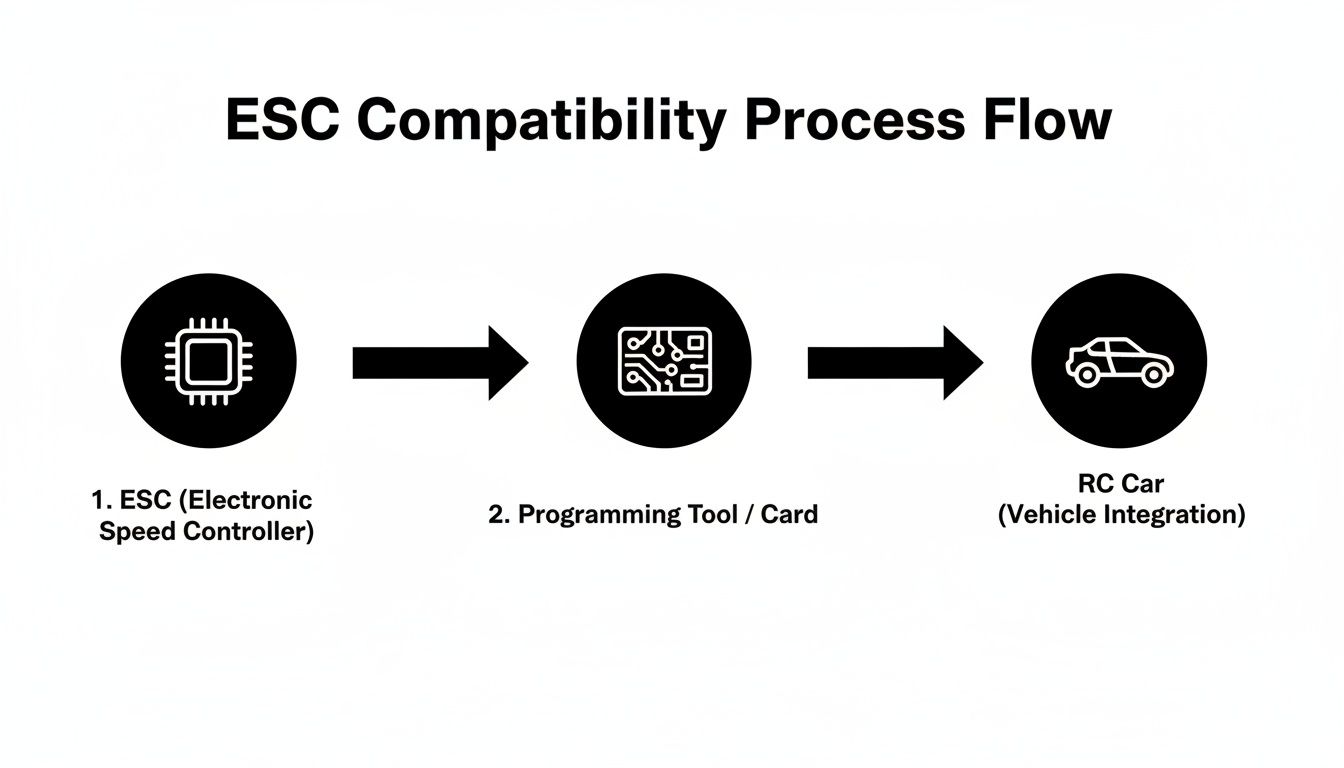
As you can see, the program card is the key that unlocks all the settings tucked away inside your speed controller.
Your Connection Checklist
To get a perfect connection every single time, just follow this sequence.
First things first, make sure your car's main battery is completely disconnected. Now, take the programming lead from your card and plug it into the correct port on the ESC. The plug is keyed, so it only goes in one way. Just make sure the black (negative) wire lines up with the negative symbol (-) on the ESC case.
With the card connected, it's time to plug your main LiPo battery into the ESC. This is what provides the juice to power up both the ESC and the program card itself.
Finally, flip the ESC's power switch on. The screen on the program card will immediately light up and show you the first programming item. That's your confirmation that it's successfully connected and has read the current settings from the ESC.
This is the standard process for most of Hobbywing's lineup, including some of their most popular tournament-grade ESCs. If you want a closer look at a top-tier speed controller that may require a different programmer, check out our review of the Hobbywing XeRun XR10 Pro G3.
Pro Tip for Safety: Always, and I mean always, remove the pinion gear from your motor before connecting a program card or powering on your ESC for programming. This is a non-negotiable safety step. It completely prevents any accidental throttle signal from sending your drivetrain spinning, which can strip gears or worse, cause an injury.
It's a simple habit that takes about ten seconds but eliminates a massive risk. Once you're done tuning, power everything down, unplug the card, and then you can pop your pinion gear back on. Easy.
Decoding the Main Programming Parameters
Once your Hobbywing program card is connected, you're looking at the nerve centre of your RC car's performance. This isn't just about tweaking numbers; it's about understanding what each parameter actually does on the track. Making smart, deliberate adjustments here is what separates a good setup from a great one.
Let's dive into the settings that will have the biggest impact on your car's behaviour, especially in competitive on-road classes.
Running Mode
This is your most fundamental setting, defining how the throttle and brake respond. You'll see three choices, but for racing, only one really matters.
- Forward Only with Brake: This is the standard for any form of competition. It gives you throttle control in one direction and braking, with no reverse.
- Forward/Reverse with Brake: Often called "double-click" reverse. This mode requires you to brake to a full stop and return the trigger to neutral before reverse will engage. It's useful for bashers but illegal in most racing formats.
- Forward/Reverse: An instant reverse as soon as you pull the trigger back past neutral. Great for rock crawlers, but completely unsuitable for on-road racing.
For any 1/10 touring or 1/12 pan car, you will always select Forward Only with Brake.
Drag Brake Force
Drag brake is easily one of your most powerful tuning tools. Think of it as an automatic braking effect that kicks in the moment you let off the throttle, much like the engine braking in a full-scale car. A tiny adjustment here can completely change how your car enters a corner.
Imagine you're driving a 1/10 touring car on a tight, high-grip carpet track. A higher drag brake (around 10-15%) will slow the car more aggressively off-power, helping it pivot sharply into the corner. On a large, flowing asphalt track, you'd want less drag brake (5-8%) to let the car roll freely through the sweepers, carrying more corner speed.
Low Voltage Cut-Off
This setting is purely for battery protection—nothing else. It tells the ESC to cut power to the motor when your LiPo battery's voltage drops to a certain level, preventing irreversible cell damage. Discharging a LiPo too far is the fastest way to kill it.
For racing, setting this to 3.2V or 3.4V per cell is a safe, reliable choice. I know some racers who disable it and rely on their timers, but the risk of ruining a $100+ battery just isn't worth the tiny potential gain.
The Low Voltage Cut-Off is your safety net. Treat it as a non-negotiable setting to protect your investment in high-quality LiPo batteries. It ensures your power source stays healthy race after race.
Start Mode or Punch
This parameter dictates how aggressively the ESC applies power from a standstill. It’s all about managing wheelspin and getting a clean launch. A higher punch level means a much more aggressive initial hit of acceleration.
On a high-grip carpet track, you might run a higher punch setting (like Level 7-9) to launch as hard as possible. But on a dusty, low-grip asphalt surface, that same setting would just light up the tires. In that scenario, you’d dial the punch way back (to Level 3-5) for a smoother, more controlled acceleration that actually puts the power down.
Max Brake Force
This one does exactly what it says: it determines the maximum braking power you get when you push the trigger forward. If you set this too high, you’ll lock up the wheels and spin out under hard braking. The goal is to find the highest setting that slows the car down quickly without losing control.
For most on-road cars, a value between 60% and 85% is a great starting point. From there, you can fine-tune it based on track grip and your own driving style to find that sweet spot where you have strong, consistent brakes without any instability.
Race-Winning Setups for On-Road Classes
Every track is different, but showing up to a race weekend with a solid baseline setup is a massive advantage. It lets you skip the initial guesswork and get right into fine-tuning for the day's conditions. Using your Hobbywing program card to lock these settings in means your car is consistent and competitive from the very first practice lap.
The setups below are proven starting points gathered from experienced racers, optimized for the common scenarios you'll find in 1/10 touring and 1/12 pan car racing. They give you a strong foundation for both high-grip carpet and sealed asphalt—surfaces that demand very different approaches to power delivery and braking.
Recommended Baseline ESC Settings
I've put together a table with some race-proven starting points for three popular competitive classes. Think of these as your initial setup—get them programmed in, then start making small adjustments based on how the car feels on the track.
Baseline ESC Settings for Competitive On-Road Racing
These are race-proven starting points for popular classes using the Hobbywing Program Card.
| Parameter | 1/10 Touring Blinky (Carpet) | 1/10 Touring Modified (Asphalt) | 1/12 Pan Car (Carpet) |
|---|---|---|---|
| Running Mode | FWD/Brake | FWD/Brake | FWD/Brake |
| LVC | 3.4V/Cell | 3.4V/Cell | 3.4V/Cell |
| Drag Brake | 8-12% | 4-6% | 15-20% |
| Punch | Level 7-9 | Level 4-6 | Level 5-7 |
| Max Brake | 75% | 87.5% | 62.5% |
These numbers aren't just a guide; they're battle-tested settings that will get you in the ballpark right away, so you can focus on driving and making minor tweaks.
Strategic Insights Behind the Numbers
These aren't random figures; there’s a reason behind every setting. Take the high 15-20% drag brake for 1/12 scale, for instance. Those lightweight, direct-drive cars rely on aggressive off-throttle slowing to help them rotate sharply in tight infield sections. It's a must-have for quick lap times.
On the flip side, a Modified Touring car on a big asphalt track needs just a touch of drag brake (4-6%) to maximize corner-entry speed and carry momentum through wide, flowing sweepers. We also dial the Punch way back on asphalt to keep the insane power of a modified motor from creating useless wheelspin on a lower-grip surface.
A strong baseline setup is your reference point. Once you have it dialled in, make only one change at a time and run a few laps to feel the effect. This methodical approach is the secret to truly understanding what your car needs.
Of course, getting the power down also depends on your chassis setup, and having the right rubber is a massive piece of that puzzle. To learn more, check out our guide on how to choose the best RC car tires for your track conditions.
Finally, while program cards are essential for serious RC racing, it's always fun to see how vehicle dynamics play out in other formats, like the elaborate Giant Scalextric tracks you see at events. This baseline gives you a competitive starting point, letting you focus on the small adjustments that will put you ahead of the competition.
Solving Common Connection and Setup Issues
Even the most seasoned racers run into hiccups in the pits. When your Hobbywing program card decides to be difficult, it’s usually down to a simple issue that’s quick to fix. Panicking isn’t an option when your next heat is just minutes away; a methodical approach is all you need to get back on track.
The most common complaint is the card not powering on at all. Before you start thinking the card is dead, just check the basics. Is your main battery connected to the ESC, and is the ESC’s power switch turned on? The program card gets its power straight from the ESC, so no battery means no juice for the card.
Diagnosing Connection Failures
If the card powers on but you’re seeing garbled text or it just won’t read the ESC, your next stop is the connection itself. That small lead between the card and the ESC is often the culprit.
- Check the Port: Make sure the programming lead is plugged into the right spot. On a lot of ESCs, this means you have to unplug the fan and use that specific three-pin port.
- Verify Orientation: The plug is keyed, but you'd be surprised how often it gets forced in the wrong way. Double-check that the black (negative) wire on the lead lines up with the negative (-) symbol on the ESC case.
- Secure the Connection: Give the plug a gentle push to make sure it’s fully seated. A loose connection is one of the most frequent causes of those frustrating, intermittent read errors.
A stable connection is everything. If you see the card flicker or reset when you wiggle the wires, you’ve found your problem. A damaged lead or a loose pin in the ESC port needs to be sorted out immediately if you want reliable tuning.
When Settings Fail to Save
Another really frustrating issue is when you adjust a setting, hit "OK," but the change doesn't actually stick. This one has a simple fix. After you confirm the new value, you have to power cycle the whole system.
Just turn the ESC off, wait a few seconds, and then turn it back on. The program card will read the settings again, and you should see your new value displayed. If the old setting pops back up, it could point to a firmware compatibility issue between an older card and a brand-new ESC, but that's pretty rare with the supported models.
By running through these quick diagnostic steps, you can solve 99% of setup problems without missing your race.
A Few Common Questions
When you're first getting familiar with the Hobbywing program card, a few questions always seem to pop up in the pits. Getting these sorted out early will save you a ton of time and make sure you're using this essential tuning tool the right way.
Can I Use the LED Program Card with a G3 ESC?
No. The classic LED Program Card that we stock is a workhorse, but it's designed for specific product lines like the QuicRun series and older XeRun models. Newer generation ESCs like the XeRun G3 or G4 series require a different tool.
Those modern speed controls need the OTA Programmer module. While we don't carry the OTA module, it's important to know the difference. Always check your ESC's manual to confirm which programmer you need to avoid buying the wrong one.
Does the Program Card Save My Setups?
This is a common point of confusion. The card itself doesn't actually store any of your settings. Think of it as just a screen and keyboard for your ESC.
All the settings are saved directly to the ESC's internal memory. When you scroll through the menus and press "OK" to lock in a change, that new value gets written straight to the speed control. The card is just the middleman.
One of the most common mistakes I see racers make is forgetting to power cycle the ESC after making changes. For your new settings to actually take effect on the track, you have to turn the ESC off and then back on again.
At digital-rc, we stock the essential electronics you need to stay competitive on the track. Explore our full collection of Hobbywing ESCs and programmers today. Find your competitive edge at https://digitalrc.ca.